Roborock Saros Z70 review: a robot vacuum with a robotic arm
The Saros Z70 is the first mainstream robot vacuum with a folding robotic arm that can pick up socks, slippers and tissues. It’s also an excellent mopper with very good obstacle avoidance. The arm works only some of the time, though, and the price is hard to justify on cleaning alone.
In this review
The Roborock Saros Z70 is the most ambitious robot vacuum I’ve looked at. Its folding five-axis arm can recognize and pick up a short list of small items instead of just steering around them. But it’s not ready to replace your pre-cleaning sweep: lab tests show it misses most objects before it ever reaches for them. As a cleaner, it’s an excellent mopper with very good obstacle avoidance, strong hard-floor vacuuming and below-average carpet cleaning. Buy it if you love new technology and find it well discounted; otherwise a Saros 10R or Qrevo Edge cleans as well for much less.
Roborock Saros Z70 at a glance
Roborock Saros Z70 pros and cons
- Unique arm that picks up socks, slippers and tissues
- Arm works well under remote control
- Second-best dried-stain mopping score Vacuum Wars had recorded
- Leaves very little water behind after mopping
- 22 of 24 obstacles avoided in lab testing
- Slim 3.14-inch body slides under low furniture
- Climbs thresholds up to about 1.5 inches
- Mop pads can stay in the dock for carpet runs
- Arm detects only a fraction of eligible objects
- Below-average carpet deep cleaning
- Side brush retracts on carpet, missing edges and corners
- Hair can tangle around the brushes
- Tiny 6 oz robot dustbin
- Thin cables and tasseled rugs can trip it up
- Very high list price
Who should buy the Roborock Saros Z70?
- Technology enthusiasts and early adopters
- Homes with mostly tile, laminate or hardwood
- Floors that need regular mopping
- Rooms with low furniture
- Anyone who finds it at a deep discount
- Homes with lots of carpet or area rugs
- Heavy-shedding pets
- Buyers who want the best value
- Anyone expecting the arm to tidy up for them
First impressions of the Saros Z70
Robot vacuums have looked more or less the same for a decade: a round disc that bumps, maps and avoids. The Saros Z70 is the first one in a while that made me stop and look twice.
The idea is simple to explain and hard to pull off. Instead of asking you to clear the floor before every run, the robot clears some of it itself. That turns a robot vacuum from a pure cleaning tool into an early home helper.
It also raises the bar for judging it. A robot like this has to clean well and handle objects well, and the published tests show it’s much better at the first than the second. Keep that split in mind as you read on, because it shapes my verdict.
What the Roborock Saros Z70 is
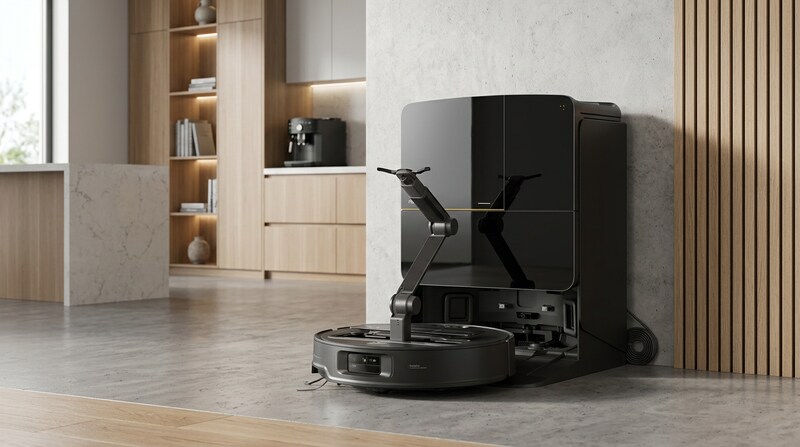
The Saros Z70 is Roborock’s most unusual robot vacuum. At first glance it looks like a regular Saros: a slim, dark disc with twin spinning mop pads and a large self-cleaning dock. The difference is folded inside the top.
Roborock calls it the OmniGrip arm. It’s a five-axis arm with a rotating base, two tilting joints, a rotating head and twin pincers, plus its own camera and light. When it unfolds, it can pick up small items from the floor and carry them somewhere else.
Every robot vacuum owner knows the pre-run sweep for socks, slippers and charging cables. The Z70 is the first serious attempt to automate part of that.
Under the arm, it’s a capable cleaner. Navigation uses Roborock’s StarSight Autonomous System 2.0, which combines solid-state lidar, structured-light sensing and an AI camera instead of a spinning lidar turret on top. That’s what keeps the robot just 3.14 inches tall.
How well does the OmniGrip arm work?
The arm is why anyone looks at the Saros Z70, so it’s worth being specific about what it can and can’t do.
What it’s designed to do
Roborock says the arm can lift items up to about 10.5 ounces. It targets socks, sandals and slides, small towels, and crumpled tissues or paper. In the app you set separate drop-off spots for general items and for slippers, and the robot uses its front camera and AI object recognition to decide what to grab. A manual mode lets you steer the arm yourself.
It’s off by default, and there’s a child lock and an emergency stop.
How it performed in tests
The results are mixed, and the most detailed numbers come from RTINGS. In its controlled tests the Z70 detected only 27 percent of eligible objects. Once it did decide to grab something, it did much better: it picked up 78 percent of the items it attempted and put 79 percent of those in the right place.
RTINGS’ arm results. Each step only counts objects that made it through the step before, so recognition is the real bottleneck.
Carpet made things worse. RTINGS saw the robot fail to detect eligible objects on carpet entirely in some runs.
Vacuum Wars estimated the automatic mode worked roughly half the time, with results swinging by object and conditions. It sometimes dropped items in the wrong spot. TechRadar found the arm reliable under remote control, but on its own it mistook sandals and socks for plastic bags in dim light, failed to grip a strappy sandal and left socks about 14 inches from where they started.
Android Authority saw the arm lift a shoe heavier than the official limit, then refuse a threshold and put it down. Notebookcheck said a firmware update improved the arm significantly, though not completely.
Good to know: You can train the Z70 to recognize custom objects for obstacle avoidance, but that doesn’t teach the arm to pick them up. The arm sticks to Roborock’s short list of supported items.
My take
I wouldn’t expect the arm to replace general tidying. It recognizes a limited set of items, not toys, cables or random clutter, and it works best in good light on hard floors. Think of it as an interesting bonus and a promising first version, not a finished feature.
The OmniGrip arm folds into the robot and unfolds to pick up light items.
Practical questions about living with a robot arm
A robot vacuum with an arm raises questions a normal robot doesn’t. These are the ones I’d want answered before buying the Saros Z70.
Is it safe around kids and pets?
Roborock ships the arm switched off, and you have to turn it on in the app. There’s a child lock and an emergency stop, and the arm senses when an object is too heavy to lift. Even so, I’d supervise the first few runs, especially with curious pets or toddlers around.
Where does it put things?
You set drop-off points in the app. In practice, that might mean a laundry basket for socks and a small trash can for tissues. Reviewers saw it miss those targets at times, so expect some items to land nearby rather than inside.
Does the arm slow down cleaning?
Picking things up takes extra time, so a run with the arm active is longer. Many owners will likely use the arm for a quick tidy-up pass, then run a normal cleaning cycle.
Will it get better?
Notebookcheck found that a firmware update noticeably improved the arm, which suggests Roborock is still refining the software. I wouldn’t buy it on the promise of future updates, but improvements are a realistic bonus.
Does the arm cost you anything elsewhere?
Yes. RTINGS points out that the arm takes up room that would otherwise go to the dustbin, and it ties the arm to compromises in bin size, battery life and brush performance. More moving parts also means more that can go wrong.
Tip: Register the robot and keep your receipt handy. A machine with this many moving parts is one where you’ll want the warranty paperwork in order.
Saros Z70 vacuuming performance
The arm takes up space and power, and the vacuuming results reflect that.
Hard floors
On hard floors, the Z70 does what you’d expect from a premium Roborock. RTINGS found it picked up most fine, medium and large debris, including near edges and corners, and TechRadar called its vacuuming excellent on vinyl.
Carpet
Carpet is the weak spot. Vacuum Wars’ deep-clean test, which measures how much embedded sand a robot pulls out, put the Z70 near the bottom of its results.
RTINGS found one practical reason: the Z70 retracts its side brush when it senses carpet. That may protect the brush, but it leaves debris along carpet edges and in corners where the main brush can’t reach. You can’t change this in the app. TechRadar also needed a second pass at max suction to clear oats and tea from carpet.
Pet hair
Pet hair results are mixed. RTINGS found it handled hair reasonably well and beat the Saros 10R thanks to more brush agitation, though some embedded hair stayed behind. Vacuum Wars measured below-average pet hair pickup and tangle resistance, and called crevice pickup subpar.
The tiny dustbin
The onboard bin holds only about 6 fluid ounces, which is unusually small. The arm eats into the space a bin would normally use, so the robot depends on its auto-empty dock. Heavy loads of hair or dirt can also clog the emptying port.
Tip: With a shedding pet, schedule shorter, more frequent runs so the small bin never overfills, and check the emptying port whenever you clean the brushes.
The honest picture: a very good hard-floor vacuum, but a so-so carpet cleaner for the price. Homes with lots of carpet or heavy shedders should weigh this carefully.
Saros Z70 mopping performance
Mopping is where the Z70 earns its premium. It uses two spinning pads, one of which extends out to reach baseboards, and lifts the pads about 0.9 inch when it drives onto carpet. It can also leave the pads in the dock for vacuum-only carpet runs.
It also left very little water behind: about 30 percent less than the average robot in Vacuum Wars’ test, so floors dry quickly.
Vacuum Wars got the best results with the highest water flow, the Deep+ cleaning route and the extending mop turned on. Dried ketchup needed two passes in TechRadar’s test and left a slight film, so this is still maintenance cleaning, not a replacement for scrubbing sticky messes by hand.
Best mopping settings: Max water flow, Deep+ route and mop extension on. Add a second pass for kitchens and entryways.
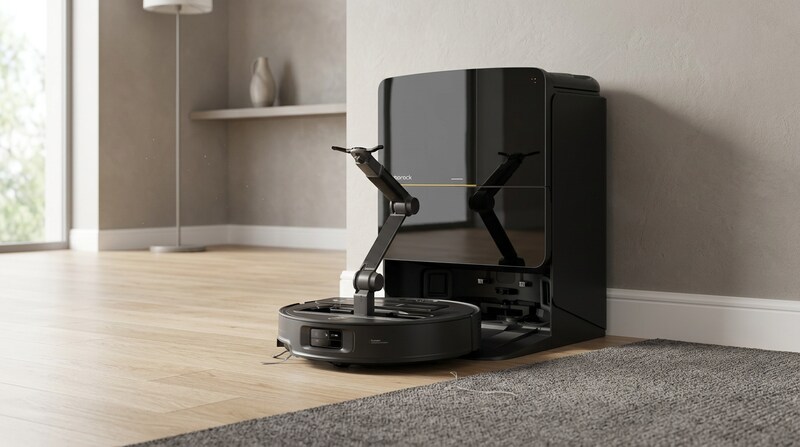
Mopping is the Z70’s strongest cleaning skill in lab tests.
Dock, app and upkeep
The Multifunctional Dock 4.0 does most of the dirty work. It empties the robot’s bin, washes the mop pads with 176°F water, dries them with 131°F air, refills the robot’s water and dispenses detergent. It also cleans its own mop tray. The clean and dirty water tanks hold about 4.2 and 3.2 quarts.
RTINGS notes the dust bag may clog before it’s actually full. TechRadar found the dock noisy, and its review unit rattled.
PCMag’s dock failed in testing
PCMag’s review unit had a docking-station malfunction. One unit doesn’t prove a wider problem, but it’s a reminder that a machine with this many moving parts has to be judged on how dependably it runs, not just on its feature list.
The app
The Roborock app is one of the best around. You can edit maps, set no-go zones, schedule runs and customize vacuuming and mopping by room. SmartPlan can pick settings for you, and there’s remote arm control, a live camera view, pet monitoring, voice assistant support and maintenance tracking.
That’s a lot of settings. Tinkerers will love it; people who just want to press a button may find it overwhelming.
What you’ll still do by hand
Battery is 6,400 mAh, and Vacuum Wars estimated about 1,115 square feet of coverage per charge.
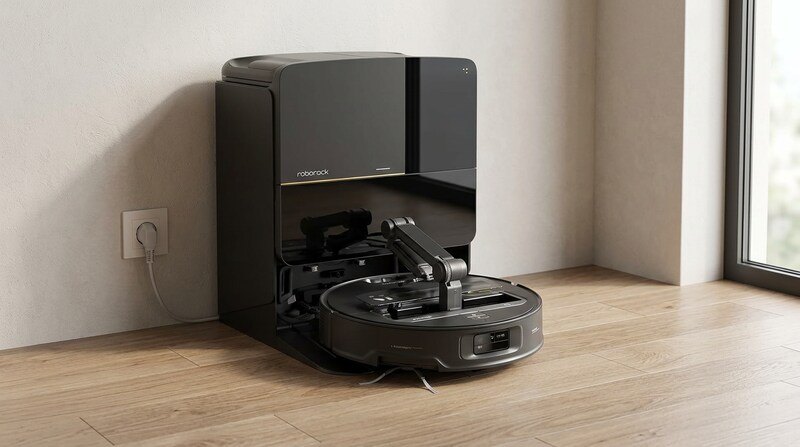
The dock handles emptying, mop washing and drying.
Who the Saros Z70 really suits
The Saros Z70 is a niche product, and I think that’s fine.
Technology enthusiasts
If you enjoy owning the newest thing and don’t mind rough edges, the Z70 is fascinating. Watching a robot vacuum fold out an arm and pick up a sock is something no other mainstream robot does.
Hard-floor homes that mop a lot
Its mopping is excellent and its hard-floor vacuuming is strong, so homes with mostly tile, laminate or hardwood get real cleaning value.
Homes with light floor clutter
Households where socks, slippers and tissues end up on the floor are the target. Even if the arm only handles some of them, that’s fewer things to pick up by hand.
Below-average embedded-dirt removal and a side brush that retracts on carpet make it a weak choice for carpet-heavy homes.
The small bin, hair tangling and mixed pet hair results add up to more upkeep.
Android Authority called it Roborock’s best cleaner at the time, but said the arm doesn’t justify roughly $1,000 more than the Saros 10R.
How to get the best results from the Saros Z70
- Start with the arm off
Run a few normal cleaning cycles first so the robot builds a good map. Then turn on the arm and set drop-off spots for general items and slippers.
- Give it light
TechRadar saw the arm misidentify items in dim light. Schedule arm runs for the daytime or leave a lamp on.
- Use the arm on hard floors
Detection drops sharply on carpet, so expect the best results on tile, laminate and wood.
- Stick to supported items
Socks, slippers, small towels and tissues under about 10.5 ounces. It won’t pick up toys or cables.
- Clear cords and fringe
Thin USB cables and tasseled rugs are its biggest navigation weak spots.
- Keep the firmware updated
Notebookcheck found updates noticeably improved the arm, so install them as they arrive.
- Use the remote control
Under manual control, TechRadar found the arm reliable. It’s handy for fetching a slipper from under the bed.
Is the Roborock Saros Z70 worth the money?
The Saros Z70 launched at $2,599, far above any other Roborock at the time. It has since been discounted heavily; Vacuum Wars listed it at about $1,699.99 when it reviewed it, and prices still vary a lot between retailers.
At full price, it’s very hard to recommend on cleaning alone. The Saros 10R and Qrevo Edge give you most of what matters for much less, and the newer Saros 20 cleans better.
At a deep discount, it becomes a more reasonable choice for someone who wants the arm. You get excellent mopping, strong obstacle avoidance and a new feature that works some of the time.
What reviewers and owners say
Price tip: Robot vacuum prices drop hard around Prime Day, Black Friday and Cyber Monday. If you’re set on the Z70, those are the times to buy.
Saros Z70 vs Saros 10R
The Saros 10R shares much of the Z70’s platform, minus the arm, which makes it the most useful comparison.
| Saros Z70 | Saros 10R | |
|---|---|---|
| Robotic arm | Yes, OmniGrip | No |
| Navigation | StarSight 2.0 | StarSight 2.0 |
| Height | 3.14 in | 3.14 in |
| Obstacles avoided (Vacuum Wars) | 22 of 24 | 24 of 24 |
| Dried-stain score (Vacuum Wars) | 139 | 103 |
| Carpet deep clean (Vacuum Wars) | 67% | 80% |
| Robot bin | About 6 fl oz | About 9 fl oz |
| List price | $2,599 | $1,599.99 |
Pick the Z70 if you want the arm and mop a lot. Pick the Saros 10R if you want excellent cleaning, better carpet results and a bigger bin for far less.
Roborock Saros Z70 specifications
From Roborock’s published specifications, the Amazon listing and independent reviews.
Best Roborock Saros Z70 alternatives
If the arm isn’t a must, the Saros 10R gives you very similar cleaning, better carpet results and better obstacle avoidance for much less. The Qrevo Edge is the value pick Vacuum Wars recommends for most people.
The Saros 20 offers far more suction and threshold climbing. For mopping-focused homes, the Saros 20 Flow has a self-cleaning roller mop.
How I researched and rated the Roborock Saros Z70
This is a researched review, not a long-term test of our own. I started from Roborock’s published specifications and the Amazon listing, then compared the hands-on and lab results published by RTINGS, Vacuum Wars, PCMag, TechRadar, Android Authority and Notebookcheck, plus owner discussions on Reddit. Where those sources disagreed, I say so above.
- Innovation (9.2): what the OmniGrip arm can do and how reliably it does it in published tests.
- Mopping (8.8): dried-stain removal, edge cleaning and water left behind.
- Vacuuming (7.0): hard floors, carpet deep cleaning, pet hair and edges.
- Value (6.2): price against features, and against the Saros 10R, Qrevo Edge and newer models.
The overall score of 7.6 is an editorial rating.
Roborock Saros Z70 FAQ
Is the Roborock Saros Z70 worth it?
Only at a good discount, and only if you want the arm. It rates 7.6 out of 10 in our review: excellent mopping and avoidance, strong hard-floor vacuuming, weaker carpet cleaning and an arm that works only part of the time.
What can the Saros Z70 arm pick up?
Light items up to about 10.5 ounces, such as socks, slippers, sandals, small towels and crumpled tissues or paper. It doesn’t pick up toys, cables or other random clutter.
Does the robotic arm work well?
Partly. RTINGS found it detected only 27 percent of eligible objects, though it picked up 78 percent of the ones it tried. Vacuum Wars estimated it worked about half the time, and TechRadar found it reliable only under remote control.
Is the Saros Z70 good on carpet?
Not especially. It scored 67 percent in Vacuum Wars’ carpet deep-clean test against a 75 percent average, and its side brush retracts on carpet, so edges and corners get missed.
How big is the Saros Z70 dustbin?
About 6 fluid ounces, which is very small. The auto-empty dock makes up for most of it.
How tall is the Saros Z70?
3.14 inches, with no lidar tower, so it fits under a lot of low furniture.
How high a threshold can it climb?
Roborock rates it for tiered thresholds up to about 1.6 inches and single steps around 1.2 inches. RTINGS measured about 1.5 inches.
Can I turn the arm off?
Yes. It is off by default, and there is a child lock and an emergency stop.
Saros Z70 or Saros 10R?
Choose the Z70 for the arm. Choose the Saros 10R for similar cleaning, better carpet results and a bigger bin at a much lower price.


- RTINGS: Saros Z70 vs Saros 10R
- PCMag: Roborock Saros Z70 review
- Reddit owner discussions about the Saros Z70
- Roborock: Saros Z70 launch announcement
- TechRadar: Saros Z70 review
- Vacuum Wars: Saros Z70 review
- Android Authority: Saros Z70 review
- Notebookcheck: Saros Z70 review
- Amazon product listing for the Roborock Saros Z70 (ASIN B0DSLBZV3F), October 2026
- Images: illustrations created from Roborock's product photo, not photos from testing
- Updated with RTINGS and PCMag findings, more test data, tips and US units.
- Review published.